
Close Panel 1.1.0: Panel tiếng Anh: SYMBOL | SELL: count (lots) | BUY: count (lots) | TOTAL TP | TOTAL SL | BREAK-EVEN | EST. STOP-OUT PRICE. Sửa hòa vốn N/A do làm tròn tiền trên lệnh nhỏ. BREAK-EVEN chỉ tính lại khi mở/đóng/đóng một phần hoặc đổi hướng, khối lượng, entry, TP/SL; không tính lại theo tick/P&L/swap đơn thuần.
EST. STOP-OUT PRICE là giá Bid ước tính tại ngưỡng broker bắt đầu đóng cưỡng bức, dùng equity, margin và Stop Out phần trăm của toàn tài khoản, giữ nguyên giá symbol khác/margin/spread. Không phải cam kết giá thanh lý và không nhất thiết là equity về0. Không mô phỏng TP/SL khớp trước, margin thay đổi hoặc broker đóng từng phần. MT5 money-mode, thiếu dữ liệu, hedge cân bằng hoặc không có nghiệm giá dương hiển thị N/A; LEVEL REACHED khi đã chạm ngưỡng. Panel không tự đóng theo hòa vốn hoặc Stop Out. Ảnh cũ chưa phản ánh giao diện mới.
Bản1.0.5 sửa dòng thống kê bị cắt và chữ Label mặc định; tự xuống hàng khi chart hẹp, kết quả đóng nằm dưới thống kê. Công thức và thao tác đóng giữ nguyên.
Close Panel 1.0.5: Dòng dưới credit hiển thị SYMBOL | SELL: số lệnh (tổng lot) | BUY: số lệnh (tổng lot) | TOTAL TP: tiền | TOTAL SL: tiền | ĐIỂM HÒA VỐN: giá. Cập nhật mỗi giây theo symbol chart; kết quả đóng nằm ở dòng riêng.
TP/SL và hòa vốn là ước tính (~). Dấu * báo có vị thế chưa đặt mức tương ứng; N/A khi không có mức, hedge cân bằng hoặc không tính được. Hòa vốn là giá Bid với spread và chi phí hiện tại giữ nguyên; MT5 chưa gồm commission, cTrader dùng NetProfit hiện tại. Không tính chi phí tương lai hoặc trượt giá. AllSymbols chỉ thay phạm vi nút đóng. Ảnh minh họa cũ chưa phản ánh dòng thống kê mới; xem hướng dẫn trong gói1.0.5.
Close Panel 1.0.4: Dòng dưới credit hiển thị SYMBOL | SELL: số lệnh (tổng lot) | BUY: số lệnh (tổng lot) | TOTAL TP: tiền | TOTAL SL: tiền | ĐIỂM HÒA VỐN: giá. Cập nhật mỗi giây theo symbol chart; kết quả đóng nằm ở dòng riêng.
TP/SL và hòa vốn là ước tính (~). Dấu * báo có vị thế chưa đặt mức tương ứng; N/A khi không có mức, hedge cân bằng hoặc không tính được. Hòa vốn là giá Bid với spread và chi phí hiện tại giữ nguyên; MT5 chưa gồm commission, cTrader dùng NetProfit hiện tại. Không tính chi phí tương lai hoặc trượt giá. AllSymbols chỉ thay phạm vi nút đóng. Ảnh minh họa cũ chưa phản ánh dòng thống kê mới; xem hướng dẫn trong gói1.0.4.
Tải miễn phí cho mọi thành viên đã đăng ký trên website; không cần xác minh IB, không thanh toán. Phần mềm không yêu cầu kích hoạt và không có thời hạn sử dụng.
Horus Close Panel v1.0.3 — Miễn phí
Panel năm nút đóng vị thế thủ công cho MetaTrader 5 và cTrader Desktop, đặt ở góc trên bên phải biểu đồ. Gói tải gồm bản MT5 và cTrader cùng hướng dẫn cài đặt.
- Close All: đóng tất cả vị thế trong phạm vi đã chọn.
- Close Profitable: đóng các vị thế đang có lãi.
- Close Losing: đóng các vị thế đang lỗ.
- Close Buy / Close Sell: đóng vị thế theo hướng mua hoặc bán.
Phạm vi và thao tác
Mặc định chỉ áp dụng symbol của chart. Bật All Symbols để áp dụng toàn bộ tài khoản đang đăng nhập. Bao gồm cả vị thế tay và vị thế từ EA/cBot khác; không lọc magic hay label. Mỗi lần bấm gửi yêu cầu đóng ngay, không có hộp xác nhận. Panel không mở lệnh, không hủy pending orders và không chạy chiến lược tự động.
MT5 phân loại lãi/lỗ theo profit + swap, chưa trừ commission. cTrader dùng NetProfit do nền tảng báo, gồm swap và commission. Hai nút lãi/lỗ bỏ qua giá trị bằng 0. Giá khớp có thể thay đổi; số tiền chốt thực tế có thể khác khi bấm.
Cài MT5
Chép HorusClosePanel.ex5 vào File → Open Data Folder → MQL5 → Experts, Refresh Navigator và kéo lên chart riêng cùng symbol. Bật Algo Trading để panel được phép đóng vị thế. MT5 chỉ chạy một EA trên mỗi chart; dùng chart riêng nếu chart hiện tại đã có EA khác. Không cần DLL hay WebRequest.
Cài cTrader
Mở HorusClosePanel.algo bằng cTrader Desktop, thêm instance cBot cho symbol cần dùng, chọn Local và Start. Không dùng Cloud/CLI vì panel cần chart controls. AccessRights.None không yêu cầu filesystem/network; quyền giao dịch vẫn do tài khoản và nền tảng quản lý.
Lưu ý sử dụng
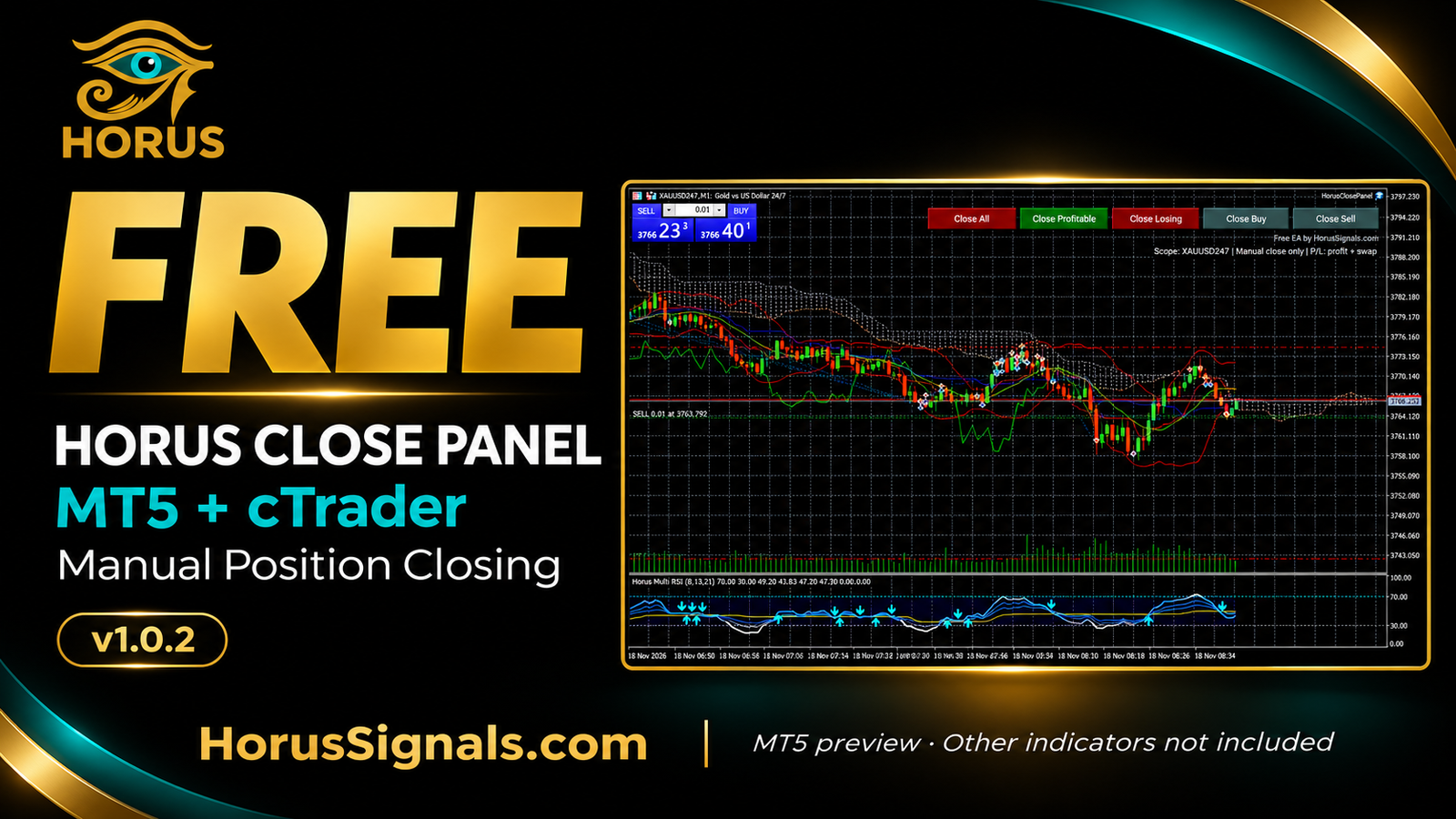
Thử trên demo trước. Nếu có lỗi, partial fill hoặc mất kết nối, kiểm tra Positions và Experts/Log trước khi thao tác tiếp; panel không tự thử lại. Bản này đã compile thành công trên cả hai nền tảng; chưa kiểm chứng đầy đủ hành vi khớp lệnh trên các loại tài khoản và broker. Không có cam kết lợi nhuận. Ảnh minh họa là MT5; những chỉ báo khác trong ảnh là sản phẩm riêng, không nằm trong gói panel. Miễn phí, không có kích hoạt trả phí hoặc thời hạn trong phần mềm.

Ảnh minh họa chụp bản 1.0.2; gói tải hiện tại là 1.0.3, giữ nguyên giao diện và logic đóng lệnh.
HORUS SIGNALS / SHOP
Sản phẩm liên quanRelated products

Close Panel 1.1.0: English panel: SYMBOL | SELL: count (lots) | BUY: count (lots) | TOTAL TP | TOTAL SL | BREAK-EVEN | EST. STOP-OUT PRICE. Fixes unavailable break-even caused by cash rounding on small positions. BREAK-EVEN is cached until position IDs, side, volume, entry, TP or SL change; quote, P/L and swap-only updates do not recalculate it.
EST. STOP-OUT PRICE estimates chart-symbol Bid at the first broker stop-out threshold from whole-account equity, used margin and the stop-out percentage, holding other prices/margin/spread fixed. It is not a guaranteed liquidation fill or necessarily equity-zero price. It does not simulate TP/SL executions, variable margin/leverage or sequential/partial liquidation. Unsupported MT5 money-mode, balanced exposure, missing data or no positive solution show N/A; LEVEL REACHED means already at the threshold. No automatic break-even or stop-out closing. Earlier images do not show this layout.
Version1.0.5 fixes clipped statistics and the default Label text. Long summaries wrap to available width, with operation results below the summary. Calculation and closing behavior are unchanged.
Close Panel 1.0.5: Below the credit, live chart-symbol statistics show SELL/BUY counts and lots, TOTAL TP/SL in account currency and estimated basket break-even Bid. Refreshes every second; close results use a separate line.
~ means estimate; * means some positions have no assigned TP/SL; N/A means unavailable or balanced exposure. Estimates hold current spread, conversion and accrued costs fixed. MT5 excludes commission; cTrader uses current NetProfit and startup PipValue. Future costs/slippage are excluded. AllSymbols affects button scope only. Earlier preview images do not show the new statistics line; see the1.0.5 package guide.
Close Panel 1.0.4: Below the credit, live chart-symbol statistics show SELL/BUY counts and lots, TOTAL TP/SL in account currency and estimated basket break-even Bid. Refreshes every second; close results use a separate line.
~ means estimate; * means some positions have no assigned TP/SL; N/A means unavailable or balanced exposure. Estimates hold current spread, conversion and accrued costs fixed. MT5 excludes commission; cTrader uses current NetProfit and startup PipValue. Future costs/slippage are excluded. AllSymbols affects button scope only. Earlier preview images do not show the new statistics line; see the1.0.4 package guide.
Free download for all registered website members; no IB verification or payment required. The software needs no activation and has no built-in expiry.
Horus Close Panel v1.0.3 — Free
A five-button manual position closing panel for MetaTrader 5 and cTrader Desktop, positioned at the top right of the chart. The download includes both platform binaries and installation instructions.
- Close All: close all positions within the selected scope.
- Close Profitable: close positions currently showing positive P/L.
- Close Losing: close positions currently showing negative P/L.
- Close Buy / Close Sell: close positions by direction.
Scope and execution
The default scope is the chart symbol. Enable All Symbols to include the entire logged-in account. Manual positions and positions opened by other EAs/cBots are included; there is no magic or label filter. Clicking sends close requests immediately without a confirmation dialog. The panel does not open trades, cancel pending orders or run an automated strategy.
MT5 classifies profit plus swap, excluding commission. cTrader uses platform NetProfit, including swap and commission. Zero P/L is skipped by profitable/losing filters. Execution prices can move, so realised results can differ from P/L at click time.
MT5 installation
Copy HorusClosePanel.ex5 into File → Open Data Folder → MQL5 → Experts. Refresh Navigator and attach it to a separate chart for the desired symbol. Allow Algo Trading so it can close positions. MT5 permits one EA per chart; use a separate chart if another EA is already running. No DLL or WebRequest is required.
cTrader installation
Open HorusClosePanel.algo in cTrader Desktop, add a cBot instance for the desired symbol, choose Local and Start. Cloud/CLI are unsuitable because this panel requires chart controls. AccessRights.None requires no filesystem/network access; broker and platform trading permissions still apply.
Usage notes
Try on demo first. After errors, partial fills or disconnections, inspect Positions and the terminal log before another action; there are no automatic retries. Both builds compile successfully; execution across all brokers and account modes has not been fully verified. No profitability guarantee. The screenshot shows MT5; other chart indicators are separate products and are not included. Free software with no paid activation or built-in expiry.
Preview images show version 1.0.2; the current download is 1.0.3 with the same panel appearance and position-closing logic.
HORUS SIGNALS / SHOP
Sản phẩm liên quanRelated products