
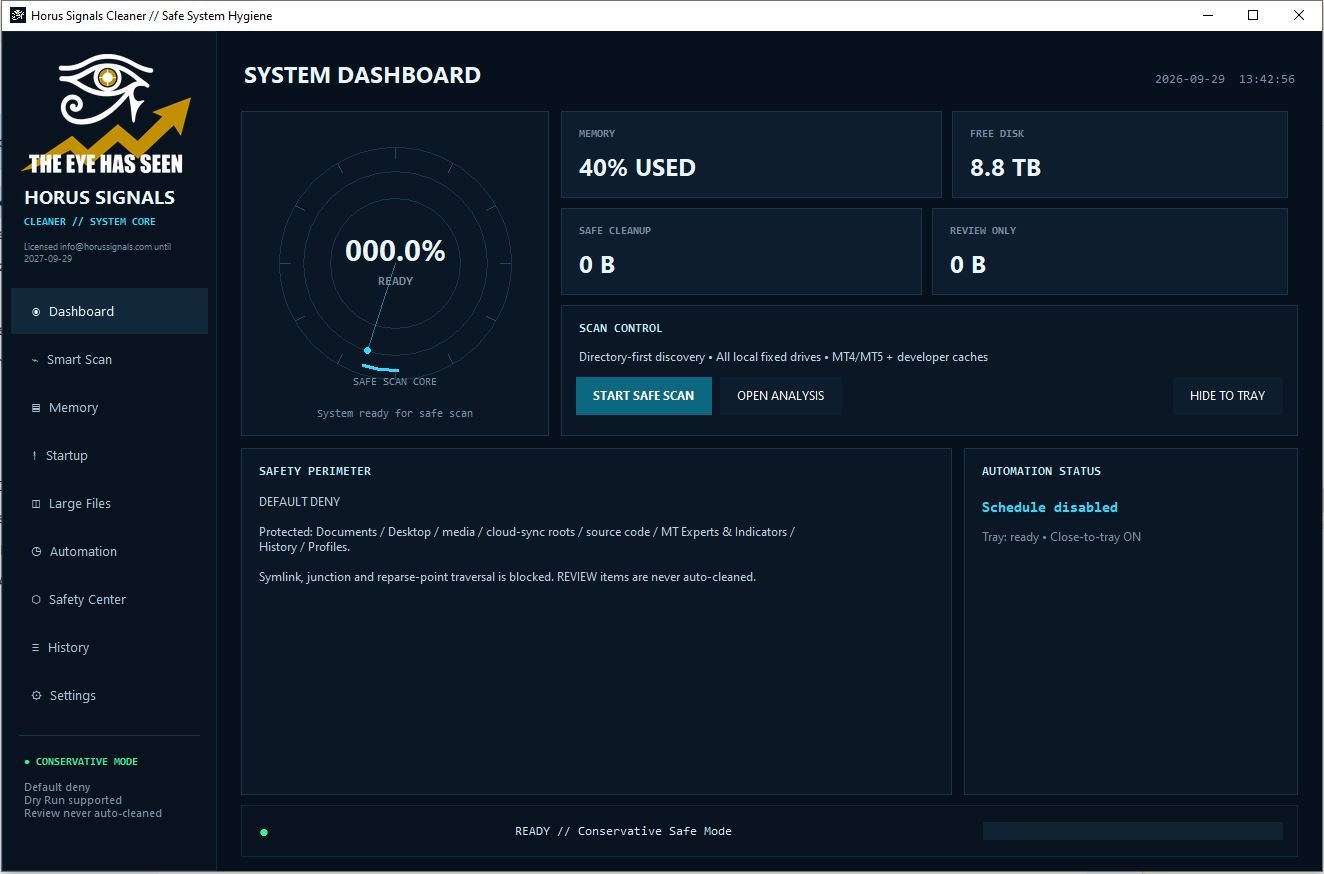
Horus Signals Cleaner là ứng dụng dọn dẹp máy tính an toàn: chỉ xoá bộ nhớ đệm (cache), file tạm và log được xác định là an toàn. Các mục cần cân nhắc được đưa vào danh sách REVIEW và không bao giờ bị xoá tự động. Chế độ chạy thử (Dry Run) bật sẵn để bạn xem trước những gì sẽ được dọn.
Bản quyền
- Bản mua: $9.9, dùng 10 năm, 1 serial = 1 máy tính (serial khoá theo máy).
- Bản miễn phí cho thành viên: dành cho thành viên Horus Signals có tài khoản MT5 mở qua liên kết đối tác của Horus Signals và đã được xác minh.
- Hệ điều hành: Windows 10/11 (64-bit) và Linux x86_64. Không hỗ trợ macOS.
Cài đặt trên Windows
- Tải file
.zipbản Windows trong Tài khoản → License & phần mềm của tôi, giải nén. - Chạy
HorusSignalsCleaner.exe(không cần cài đặt). Nếu Windows SmartScreen hiện cảnh báo: bấm More info → Run anyway.
Cài đặt trên Linux (Ubuntu 22.04+, Debian 12+, Fedora 38+)
- Giải nén file
.zipbản Linux. - Cài thư viện:
sudo apt install python3-venv python3-tk - Chạy:
bash run_linux.sh
Biểu tượng khay hệ thống trên GNOME cần tiện ích AppIndicator/StatusNotifier; nếu không có, ứng dụng vẫn thu nhỏ bình thường.
Kích hoạt
Bản mua: chọn Purchased license → nhập email đã dùng để mua → Send code → nhập mã 8 số trong email → Activate. Ô Serial có thể để trống, ứng dụng tự tìm serial còn hạn của email đó.
Bản miễn phí (thành viên): chọn Free – Horus Signals member → nhập số tài khoản MT5 (đã xác minh trong Tài khoản) và email tài khoản horussignals.com → Send code → nhập mã → Activate.
Mã chỉ được gửi tới email của tài khoản horussignals.com đã xác minh email hoặc đã mua hàng. Mã có hiệu lực 10 phút; hãy kiểm tra cả thư mục Spam.
Đổi ngôn ngữ: Settings → Language → Tiếng Việt → Apply Language (mặc định tiếng Anh).
Cơ chế kiểm tra bản quyền
- Kích hoạt gắn serial với máy tính này. Chuyển sang máy khác cần liên hệ hỗ trợ.
- Kiểm tra bản quyền khi khởi động và định kỳ. Giữ kết nối Internet; nếu bản quyền chưa được xác nhận, kết nối lại và kiểm tra trạng thái kích hoạt.
- Giờ máy tính phải đúng (lệch quá 5 phút sẽ không xác minh được).
Xử lý lỗi thường gặp
- Không nhận được mã: dùng đúng email tài khoản horussignals.com, xác minh email trong Tài khoản, kiểm tra Spam.
- “Already activated on another computer”: serial đã gắn với máy khác, hãy liên hệ hỗ trợ.
- “Too many attempts”: chờ vài phút rồi gửi lại mã.
Hỗ trợ: horussignals.com/contact
HORUS SIGNALS / SHOP
Sản phẩm liên quanRelated products




Horus Signals Cleaner is a safe computer cleaner: it only removes caches, temporary files and logs that are known to be safe. Items that need a decision go to a REVIEW list and are never deleted automatically. Dry Run is on by default so you can preview what will be cleaned.
License
- Purchase: $9.9 for 10 years, 1 serial = 1 computer (the serial is locked to that machine).
- Free for members: for Horus Signals members whose MT5 account was opened through a Horus Signals partner link and has been verified.
- Operating systems: Windows 10/11 (64-bit) and Linux x86_64. macOS is not supported.
Install on Windows
- Download the Windows
.zipfrom My Account → My licenses & software and extract it. - Run
HorusSignalsCleaner.exe(no installation needed). If Windows SmartScreen appears, click More info → Run anyway.
Install on Linux (Ubuntu 22.04+, Debian 12+, Fedora 38+)
- Extract the Linux
.zip. - Install the libraries:
sudo apt install python3-venv python3-tk - Run:
bash run_linux.sh
On GNOME the tray icon needs an AppIndicator/StatusNotifier extension; without it the app simply minimizes.
Activation
Purchase: choose Purchased license → enter the email you bought with → Send code → type the 8-digit code from the email → Activate. You can leave Serial empty; the app finds the active serial for that email.
Free (members): choose Free – Horus Signals member → enter your MT5 account number (verified in My Account) and your horussignals.com account email → Send code → type the code → Activate.
Codes are only sent to the email of a horussignals.com account that has verified its email or made a purchase. A code is valid for 10 minutes; check your Spam folder too.
Change language: Settings → Language → English → Apply Language (English is the default).
How the license check works
- Activation binds the serial to this computer. Moving to another computer requires support.
- The licence is checked at startup and periodically. Keep an Internet connection; if validation is unavailable, reconnect and check activation status.
- Keep the computer clock correct (more than 5 minutes off cannot be verified).
Troubleshooting
- No code received: use your horussignals.com account email, verify it in My Account and check Spam.
- “Already activated on another computer”: the serial is bound to another PC; contact support.
- “Too many attempts”: wait a few minutes, then request a new code.
Support: horussignals.com/contact
HORUS SIGNALS / SHOP
Sản phẩm liên quanRelated products